 JSON
JSON See your JSON clearly,
as code and as a tree.
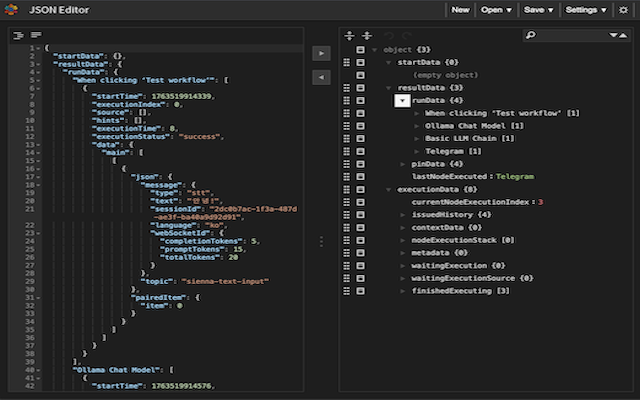
JSON Editor is a free browser extension that puts your JSON in a code view and a tree view side by side, so you can read it, edit it, tidy it up and find syntax errors. Click the toolbar icon and it opens in a new tab. No account, no server — it all happens inside your browser.
What it does
Checking an API response, fixing a config file, or unpacking a one-line blob of JSON — no need to hunt for a website.
Code view + tree view
A code editor (Ace) with syntax highlighting and line numbers on the left, a collapsible tree on the right. The arrow buttons in the middle copy the content from one side to the other.
Format, compact, validate
One click indents your JSON neatly, another squeezes it into a single line. If the syntax is wrong, it tells you which line and what went wrong.
Edit right in the tree
Change keys and values in place; insert, duplicate, remove or drag items around. Search, sort, undo and redo are all there.
JSON Schema validation
Add a schema by its URL and the editor checks your document against it and marks whatever doesn’t match.
Dark mode
The moon button in the top-right corner switches to a dark theme, and your choice is remembered next time.
Stays in your browser
No account, no analytics, no ads. The document you’re editing is kept only inside this browser — we never receive it and can’t see it.
Good to know
- To keep a file, download it with Save › Save to disk. The editor only remembers the last document you worked on.
- The Save › Save online menu is left over from the original project. We run no server for it, so nothing is saved. It will be removed in the next update.
- When you load JSON from a web address with Open › Open url, Chrome asks once for permission to access that site. The request goes straight from your browser to that server.
Download
JSON Editor is free. Install it from your browser’s official store and updates will arrive automatically.
Chrome Manifest V3
Install from the Chrome Web Store. Most Chromium-based browsers, such as Microsoft Edge and NAVER Whale, can also install extensions from the Chrome Web Store (depending on the browser’s settings).
Firefox 109 or later
Install from Firefox Add-ons. Works in desktop Firefox.
Details
- Version
- 2025.11.19
- Price
- Free
- Permissions
- Storage (settings and your document). In Chrome, access to a site is requested only when you open a URL.
- Developer
- SSEM DEV (independent developer)
The User Guide covers installation and every feature in detail.